Buyer's guide · 2026
Radio automation software:
what it does, and what to use
Every station that runs longer than the person operating it needs automation. Here is what the software actually does, how desktop and browser-based options differ, and what eight of them cost — verified August 19, 2026.
What is radio automation software?
Radio automation software plays a radio station without anyone present. It holds the music library, follows a schedule built from hour templates rather than fixed playlists, drops jingles and announcements in at set times, hands over to live presenters and takes the station back when they finish, and logs every play for royalty reporting.
What it has to do
Four jobs. Software that does the first but not the second is a media player with a timer.
| Job | What that means in practice |
|---|---|
| Schedule | Play the right thing at the right time, unattended, for months — from repeating hour shapes, not hand-built playlists. |
| Survive | Keep playing when a file is missing, a live source drops, or the schedule has a hole at 4am on a Sunday. |
| Hand over | Let a presenter take the stream, then resume automation at the correct schedule position when they sign off. |
| Log | Record every play in a form you can submit for royalty reporting. |
The scheduling model is the part that separates stations that sound professional from stations that sound like a shuffled folder — see clockwheels. The survival part is covered in dead air and failover.
Desktop or cloud
This is the decision that determines everything else, and it is not really a features question. It is a question about who keeps the station on air at three in the morning.
| Desktop automation | Browser-based automation | |
|---|---|---|
| Runs on | A Windows PC in your building, always on | The provider's servers |
| Licence | Usually one-off, yours forever | Subscription |
| Stream hosting | Bought separately | Usually included |
| Fails when | The PC sleeps, reboots for updates, or the office internet drops | The provider has an outage |
| Suits | Anyone with a spare machine and someone to look after it | Anyone who would rather not own that problem |
Desktop software is not worse. It is cheaper over several years and gives you more control. It just moves the uptime problem onto a machine you own, and that machine is the single most common reason small stations go silent.
See it for real
Watch automation actually run a station.
Library, playlist, clockwheel, show, schedule — the order that works, walked through on a station already on air, with voice tracking, live takeover and the play log at the end of it.
- About 12 minutes
- No account, no credit card
- Real screens, not mockups
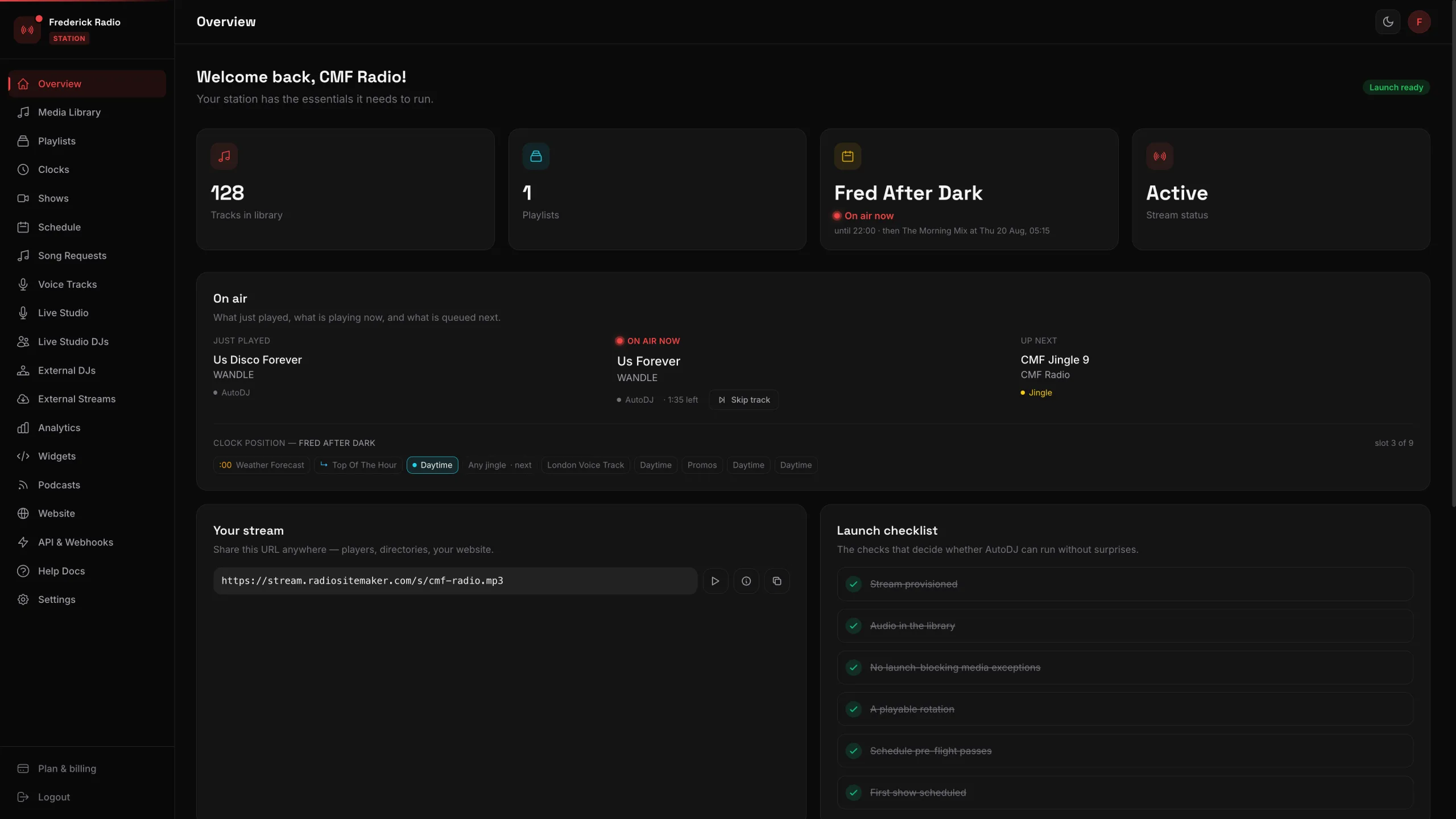 24 screens of a working station, walked through one click at a time
Eight options, with prices
Read from each vendor's published pricing page on August 19, 2026. Where a vendor publishes no price, this table says so rather than guessing — that is itself useful information when you are comparing.
| Software | Price | Model | Runs on | Stream hosting |
|---|---|---|---|---|
| RadioHost StudioThat's usStudio Pro | $199per year, or $25 / mo · + tax | Subscription | Any browser | Included |
| RadioBOSSStandard – Ultimate | $199–$299one-time | Perpetual licence | Windows | Separate |
| NextKastPro / Broadcast | $199–$399one-time | Perpetual licence | Windows | Separate |
| PlayIt LiveFree core + modules | Freebundle £300/yr or £1,499 once | Freemium | Windows | Separate |
| SAM Broadcaster CloudSilver / Gold | $30–$90per month | Subscription | Any browser | Included |
| DJB RadioDJB2 | from $89per month | Subscription | Installed | Separate |
| BSI Simian3.0 Pro | $1,999one-time | Perpetual licence | Windows | Separate |
| WideOrbitWO Aurora | Not publishedquote only | Subscription | Cloud / on-prem | Separate |
| Axel TechnologyVarious | Not publishedquote only | Licence | Windows / on-prem | Separate |
The column that matters most is the last one. A $199 perpetual licence and a $199 annual subscription are not comparable until you add the stream hosting the licence does not include.
Which one to choose
Choose desktop software
Choose RadioBOSS or NextKast if you have a machine that can stay on permanently and somebody who will look after it. A one-off licence plus cheap stream hosting is the cheapest way to run a station over five years.
Choose free software
Choose AzuraCast, RadioDJ or LibreTime if you enjoy running a server. Capability is not the limitation — see free radio automation software for what it costs in time.
Choose enterprise systems
Choose WideOrbit or Axel Technology if you run multiple stations with commercial log integration, satellite ingest and traffic systems. Expect a quote, a contract and an installation.
Choose browser-based
Choose RadioHost Studio if you want the station to run without any machine of yours staying on, with the stream and listeners included in one price.
What we do not do: RadioHost Studio has no satellite ingest, no traffic and billing integration, and no on-premise deployment. If you need those, the enterprise systems above are the honest answer.
Automation with nothing to install
Media library, clockwheels, week-ahead scheduling, voice tracking, AutoDJ, live DJ takeover, analytics and royalty exports — with the stream, 500 listeners and 30,000 listening hours included. $25 a month, or $199 a year.
No credit card required · Cancel anytime
Frequently asked questions
What is radio automation software?›
Radio automation software plays a radio station without anyone present. It holds the music library, follows a schedule of hour templates rather than fixed playlists, inserts jingles and announcements at set times, hands over to live presenters and takes the station back afterwards, and logs every play for royalty reporting.
What is the difference between radio automation software and a playlist?›
A playlist is a fixed list that ends. Automation software follows rules — two songs then a jingle, news on the hour, nothing older than 1995 before 6pm — and fills those rules from the library indefinitely. That is why a playlist needs rebuilding every week and a clockwheel does not.
Do I need a dedicated PC to run radio automation software?›
For desktop automation such as RadioBOSS, NextKast, PlayIt Live or Simian, yes — the station only plays while that machine is on, awake and connected. Browser-based automation removes that requirement because the playout runs on the provider's servers, so nothing of yours has to stay running overnight.
How much does radio automation software cost?›
Desktop licences run from free to about $1,999 one-time; RadioBOSS is $199 to $299 perpetual and BSI Simian 3.0 Pro is $1,999. Subscription platforms run from about $30 per month. Enterprise systems from WideOrbit and Axel Technology are quote-only. Desktop prices exclude stream hosting, which is billed separately.
Is there free radio automation software?›
Yes — RadioDJ, AzuraCast, LibreTime and Rivendell are all free, and PlayIt Live has a free core. The licence is free but the machine, the streaming server and the maintenance are not, which is usually the larger cost over a year.
Prices were read from each vendor's own published pricing page on August 19, 2026. Where a vendor does not publish a price, this page says so rather than estimating. Figures in currencies other than USD are shown as published.